Showing posts with label Oracle Cloud. Show all posts

Tuesday, May 30, 2023

Errors ORA-12154, ORA-29003 when connecting to Autonomous Data Warehouse using Django

When connection to Autonomous Data Warehouse Using Django web framework first we come across “ORA-12154” error. That means Django cannot be able to connect to the Oracle Database service name with the settings in settings.py file.

File "C:\django\db\backends\oracle\base.py", line 254, in get_new_connection return Database.connect( cx_Oracle.DatabaseError: ORA-12154: TNS:could not resolve the connect identifier specified

First copy the tnsnames.ora into local system and test tnsping.

C:\> tnsping <service Name>

If the tnsping is working fine, then below are the passible reason for ORA-12154 error
  • TNS_ADMIN might not be configured or set the right path
  • There might be a typo in service name
  • Connection details in settings.py might not be correct
We found that TNS_ADMIN is not set to the right path and updating the correct path resolved the issue. But we have received new error

ORA-29003: SSL transport detected mismatched server certificate

Django supports Oracle Database 19c or higher versions but cx_oracle python driver required. We verified that required driver is installed. We try to connect using SQL*PLUS but still receiving same error. That means there is no issue with the settings.

After research we found that 12c client is not supported for new mTLS authentication as per document “ALERT: Action Required for Autonomous Databases (Doc ID 2911553.1)”

We have installed Oracle 19c client and were able to connect without any issues.

Below are the options to resolve the issue

1. Install certified oracle client versions 11.2.0.4.220719 (or later), 18.19 (or later), 19.2 (or later), 21 (base release or later)

2. Update Autonomous database instance to allow both TLS and mTLS authentication.
  • Goto Autonomous Database Details page --> Network --> click Edit in the Mutual TLS (mTLS) Authentication field.
  • Change the value to allow TLS authentication, deselect Require mutual TLS (mTLS) authentication
  • Click Update
3. Use ssl_server_dn_match=no in the connect string (when using 12c client updating the value to “no” didn’t help )

I hope this helps.

Thanks
Satishbabu G, Oracle ACE Pro

Sunday, May 14, 2023

UN World Innovation Day: Igniting Change through Creativity and Collaboration

Whenever there is a global challenge, the Innovation has always played an important role to solving challenges. Every year the United Nations celebrates Innovation Day on the 21st of April to recognizes the importance of innovation in harnessing the economic potential of nations. As world faces unprecedented crises in health, education, the future of work and economy, it is important for us to find innovative solutions together

The United Nations (UN) has set forth 17 Sustainable Development Goals (SDGs) to tackle wide range of global challenges by 2030 which includes climate change, poverty, eradication and beyond. We will explore how Generative Artificial Intelligence (AI) can be used to achieve of these goals for better future.

                           

The UN World Innovation Day Hack 2023 is not just another hackathon; it's a unique opportunity to collaborate with encouraging individuals to creatively utilize their skills to generate new ideas and solutions for various critical areas. These include health and wellbeing, economic growth, decent work, and quality education. Hackathon brings together creative minds from around the world to generate innovative solutions for pressing issues. By bringing together a diverse group of talented individuals, the hackathon helps to provide meaningful solutions to pressing challenges.

Hackathon gives an opportunity to connect with new people from various backgrounds, experiences and expertise come together to collaborate, share ideas, and push the boundaries of innovation. You will have the opportunity to learn from each other, explore, generate innovative solutions, and network with inspiring individual beyond the event.

This year's hackathon introduces two brand new challenges:
  • GPT4Good
  • Data4Good
These challenges can address crucial areas where innovation can make a significant impact.

In the "GPT4Good" challenge, participants will explore the potential of GPT (Generative Pre-trained Transformer) models to address social, environmental, and humanitarian issues. The GPT is a cutting-edge artificial intelligence technology, has the power to generate human-like text, making it a valuable tool for various applications. From enhancing accessibility to fostering sustainable practices, participants will harness the power of GPT to create innovative solutions that contribute to the greater good.



The "Data4Good" challenge focuses on leveraging the power of data to drive positive change. With the proliferation of data in our digital age, there is a tremendous opportunity to extract insights and make informed decisions that benefit society. To address critical issues such as participants will work with diverse datasets, apply data analytics, visualization, and machine learning techniques to address critical issues. Participants will be encouraged to explore how data can be ethically collected, analyzed, and utilized to address pressing global issues.

The UN World Innovation Day Hack 2023 event schedule, spanning from May12th to May 15th, promises an exhilarating journey filled with creativity, collaboration, and problem-solving.


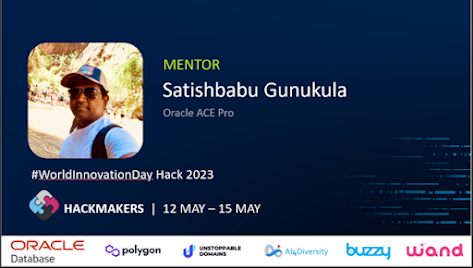
The UN World Innovation Day Hack 2023 is made possible through collaboration with Hackmakers, a global community of changemakers and innovators, joins hands with sponsors such as Oracle, AI4Diversity, Polygon, Unstoppable Domains, Buzzy and Wand to support this event. These organizations bring their expertise, resources, and mentorship to provide participants with the necessary tools to transform their ideas into tangible solutions.

The Hackathons bring over 1000+ participants and mentors around the world. In this blog post, I express my deep gratitude to all the mentors who generously contribute their time, expertise, and support to guide teams and projects during these hackathons as they play essential role in making these events successful.

To find answers to common queries and gain a better understanding of the hackathon logistics visit the official hackathon FAQ page at https://www.worldinnovationday.com/faq .

To access valuable resources and guides visit resources page at https://www.worldinnovationday.com/resources. It will provide necessary tools and knowledge to overcome challenges and push the boundaries of innovation.

To access Challenge and Sponsored resources details, visit the challenge resource page
https://www.worldinnovationday.com/challenge-resources.

Join on this transformative journey, meet incredible individuals, test your skills, and deliver meaningful impacts. Together, let's unleash the potential of innovation and create a world that thrives on collaboration, inclusivity, and positive change.

Conclusion: The UN World Innovation Day Hack 2023 is a global celebration of creativity, collaboration, and innovation. As an official Mentor for this event, I am honored to be part of a community to address pressing global challenges through technology and creative thinking. As we work together, let us continue to inspire, guide, and empower the next generation of innovators for better future.

#WorldInnovationDay #Hackathon #GptForGood #DataForGood #Innovation #Collaboration

Regards
Satishbabu G, Oracle ACE Pro


Monday, December 12, 2022

Webinar: Oracle Data pump enhancements in Oracle 21c

This Webinar helps you to understand Oracle data pump new features in Oracle 21c and take an advantage of these features.

Date and time: Dec 21st 2022 8:00am-9:00am
Pacific Daylight Time (San Francisco, GMT-07:00)

This Webinar covers following Topics.
  • Introduction to Oracle Data Pump
  • CHECKSUM, CHECKSUM_ALGORITHM
  • VERIFY_ONLY and VERIFY_CHECKSUM
  • INCLUDE and EXCLUDE in the Same Operation
  • Index Compression
  • Transportable Tablespace Enhancements
  • JSON Data Type Support
  • Export/Import from Cloud Object Store
  • Q&A
To register for this Webinar, please send an email to SatishbabuGunukula@gmail.com
Please use Zoom Link to join the Webinar.  

Note that registrations are limited and first come and first serve basis.
You will receive an email confirmation with meeting session link.

For presentation link Click here 

Thanks & Regards,
http://www.oracleracexpert.com

Thursday, November 12, 2020

Oracle RAC and Grid new features in 19c

Oracle Database 19c has many exciting new features and in order to take advantage of these features you need to upgrade the databases from older versions to Oracle 19c

Join the Webinar to learn New Features in Oracle 19c RAC and Grid

Date and time: Nov 25th 2020 8:00am-9:00am
Pacific Daylight Time (San Francisco, GMT-07:00)


To register for this Webinar, please send an email to SatishbabuGunukula@gmail.com. Note that registrations are limited, first come and first serve basis only. You will receive an email confirmation with meeting session link.

For Presentation, link "Click here"

Thanks & Regards
http://www.oracleracexpert.com

Tuesday, June 16, 2020

Duplicating On-premise Database to Oracle Cloud in Oracle 18c

From Oracle 18c, by using DUPLICATE command you can duplicate an on-prem database to Oracle Could. Oracle databases on Oracle Cloud are always encrypted even if no encryption clause is specified during duplication.

Using Oracle RMAN you to perform two main types of database duplications.
  • Backup-based duplication – In this method we will use pre-existing RMAN backups or copies of the source database. 
  • Active database duplication - The database will be duplicated by copying the live source database over the network to the auxiliary instance. 
Follow the steps to migrate on-prem database to Cloud:
1. Ensure the prerequisites for the DUPLICATION technique are met, see Prerequisites for Duplicating a Database".
2. Configure Recovery Manager to use Oracle Database Backup Cloud Service as the backup destination. Use CONFIGURE command. Pls refer Oracle Cloud Using Oracle Database Backup Service for more details.

Syntax:-
RMAN> CONFIGURE CHANNEL DEVICE TYPE sbt
PARMS='SBT_LIBRARY= SBT-library-location-for-backup-module,
SBT_PARMS=(OPC_PFILE=location-of-the-configuration file)';

Ex:-
RMAN> CONFIGURE CHANNEL DEVICE TYPE sbt
PARMS='SBT_LIBRARY=/oracle/18c/lib/libopc.so,
SBT_PARMS=(OPC_PFILE=/oracle/18c/dbs/emp.ora)';

3. Complete the planning tasks, as described in "Planning to Duplicate a Database

4. Prepare the auxiliary instance, as described in "Preparing the Auxiliary Instance"

• You must create auxiliary instance as CDB and start instance with enable_pluggable_database=TRUE in the initialization parameter file
• When instructed to create an initialization parameter file for the auxiliary instance, user must copy the file from the source database. This ensures that the auxiliary instance is also a CDB. After you copy the file you need to perform the following steps:
   – Modify the DB_NAME parameter
   – Modify the various destination/location parameters
• Start the auxiliary instance in NOMOUNT mode.

5. Start RMAN and connect to the root as a common user with the SYSBACKUP privilege or SYSDBA.

6. If the source CDB uses encryption, then open the Oracle keystore that contains the master key on the source CDB.

7. Configure RMAN channels, if necessary, as described in "Configuring RMAN Channels for Use in Duplication".

8. On the destination CDB, open the Oracle keystore from the source CDB. If the destination CDB uses a password-based software keystore, then you must specify the password used to open this keystore

SET DECRYPTION WALLET OPEN IDENTIFIED BY 'password';

9. Use the DUPLICATE command to duplicate the source CDB.

Use one of the following options of the DUPLICATE command:
  • DUPLICATE DATABASE or DUPLICATE...ACTIVE DATABASE - Use this command for duplicating non-CDBs and CDBs.
  • DUPLICATE DATABASE ... FOR STANDBY - Use this command create a standby database by duplicating the source.
  • Use the DUPLICATE DATABASE ... FOR FARSYNC – Use this command to create an Oracle Data Guard far sync instance using duplication.
  • DUPLICATE PLUGGABLE DATABASE – Use this command to duplicate one or more PDBs while connected to the root.
You can also use SET NEWNAME command to specify alternate names for duplicate database files,

Note that Using duplication to create a standby database to Oracle Cloud is not supported


Regards
Satishbabu Gunukula, Oracle ACE

Monday, March 16, 2020

Webinar: What’s New in Oracle Database 19c?

Oracle Database 19c has many exciting new features and in order to take advantage of these features you need to upgrade the databases from older versions to Oracle 19c

Join the Webinar to learn New Features of Oracle Database 19c

Date and time: Mar 31st 2018 8:00am-9:00am
Pacific Daylight Time (San Francisco, GMT-07:00)

To register for this Webinar, please send an email to SatishbabuGunukula@gmail.com.

Note that registrations are limited, first come and first serve basis only. You will receive an email confirmation with meeting session link.

For Presentation, link "Click here"

Thanks,
Satishbabu Gunukula, Oracle ACE
http://oracleracexpert.com